Data Connections
Connect an app to your own database or warehouse — how to set one up, what your app receives, and exactly what to enter for each source.
A data connection is a database or warehouse your app reads from or writes to. You register it once on the project, paste whatever credential you were given, and every app Amira builds for that project can reach it — while it is being built and afterwards.
A connection is not a skill. A skill is something your app calls over HTTP; a connection is something it connects to, with a driver.
Set one up#
Connections live on the project, in the Canvas side panel under Data connections. Setting one up is two steps: first you register the connection, then you add its credential.
Step 1 — Register the connection#
Use something your app can be written against — warehouse, reporting,
crm. The name becomes the prefix on every environment variable the app
receives, so a project with several connections never has two competing for one
variable.
Pick from the list, or choose Something else and type the engine's name. Anything is accepted — Amira never refuses a source it has no built-in support for. The choice decides one thing only: whether Amira can renew the credential for you. If you pick a source it can renew (Databricks, Microsoft), the form names the exact keys it will need.
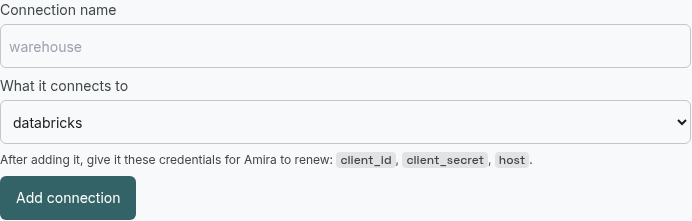
Clicking Add connection creates the connection with no credential yet. That is expected — the credential goes in next.
Step 2 — Add the credential#
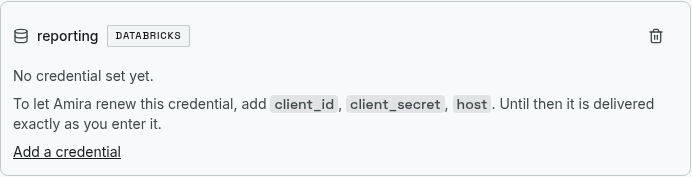
The new connection appears as a card saying No credential set yet. Click Add a credential on it and add each key your source needs, one at a time:
Use the name your source calls it — the per-source sections below list exactly what to add. For a source Amira renews, use those names exactly; a key named anything else is delivered as ordinary config and the renewal will not happen.
Paste it exactly as your team gave it to you. Leave Keep this value private ticked for anything secret — those go into a vault and are never shown again, or returned by the API. Untick it for plain configuration like a hostname, which stays readable so you can check it.
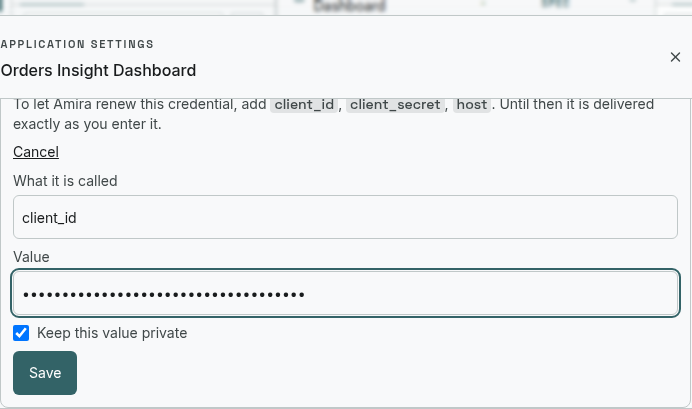
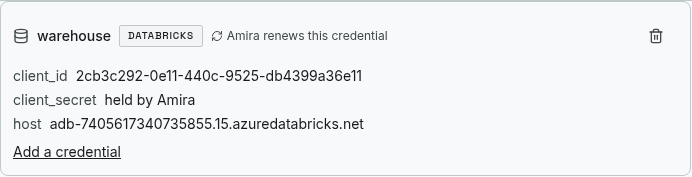
Repeat Add a credential for each key. When every key a renewable source needs is present, the card shows Amira renews this credential.
What your app receives#
Every process Amira starts for your app gets the connection's values in its
environment, prefixed with the connection's name. A connection named
warehouse with keys host and http_path becomes:
WAREHOUSE_HOST=adb-7405617340735855.15.azuredatabricks.net
WAREHOUSE_HTTP_PATH=/sql/1.0/warehouses/7165a1d9ef449333
A variable ending in _TOKEN_FILE holds a path, not a value. The credential
is the contents of that file, and Amira rewrites it as the token is renewed — so
read the file at the point of use rather than caching what it said at startup.
Values rotate. A copy pasted into source or a config file is correct for about an hour and then silently wrong, and the failure looks like your data source rejecting the app rather than a stale copy. Read the variable — or the file it points at — each time you need it.
Databricks#
Amira renews Databricks credentials: pick the source databricks, and it
exchanges your service principal for a short-lived OAuth token, renewed while the
app runs.
| Key | Private? | Purpose |
|---|---|---|
client_id | no | Service principal application ID — renewal |
client_secret | yes | Service principal secret — renewal (never delivered to the app) |
host | no | Workspace URL, e.g. adb-1234567890.11.azuredatabricks.net |
http_path | no | SQL warehouse HTTP path — your app needs it to run queries |
catalog | no | Unity Catalog the app reads |
The first three trigger renewal; http_path and catalog are delivered to the
app so it can actually query. Do not add an OAuth URL — Amira derives the
token endpoint from host.
Your app receives WAREHOUSE_HOST, WAREHOUSE_TOKEN_FILE (the renewed bearer
token), WAREHOUSE_HTTP_PATH, WAREHOUSE_CATALOG. Read the token from the file
at request time; connect with the Databricks SQL connector.
Microsoft Graph and OneDrive#
Amira renews Microsoft identities: pick microsoft-graph. This is what
OneDrive, SharePoint and the rest of Microsoft Graph use.
| Key | Private? | Purpose |
|---|---|---|
client_id | no | App registration (client) ID |
client_secret | yes | Client secret |
tenant_id | no | Directory (tenant) ID |
Your app receives <NAME>_TENANT_ID and <NAME>_TOKEN_FILE — a Graph access
token, renewed for you. Read it from the file and call Graph as normal.
PostgreSQL#
Delivered exactly as you enter it — Postgres credentials do not expire, so there
is nothing to renew. Pick Something else → postgres.
Add one key, dsn, private, holding the connection string:
postgresql://user:password@host:5432/dbnameYour app reads <NAME>_DSN. If your driver wants the parts separately instead,
add host, user, password, dbname as separate keys and read
<NAME>_HOST, <NAME>_USER, and so on.
SQL Server#
Delivered as entered. Pick Something else → sqlserver. Add either a dsn
key with your connection string, or the parts your driver expects:
| Key | Private? |
|---|---|
host | no |
database | no |
user | no |
password | yes |
Azure SQL requires encryption; keep whatever your connection string or driver
sets for that. Your app reads the prefixed names (<NAME>_HOST, …).
MySQL#
Delivered as entered. Pick Something else → mysql. Add a dsn
(mysql://user:password@host:3306/dbname, private), or host / user /
password / dbname separately. Your app reads the prefixed names.
Cosmos DB#
Delivered as entered — Cosmos account keys do not expire, so there is no renewal.
Pick Something else → cosmos-db and add:
| Key | Private? | Purpose |
|---|---|---|
endpoint | no | Account URI, e.g. https://myacct.documents.azure.com:443/ |
key | yes | Account primary (or secondary) key |
Or add a single connection_string key holding the full connection string, kept
private. Your app reads <NAME>_ENDPOINT and <NAME>_KEY (or
<NAME>_CONNECTION_STRING) and connects with the Azure Cosmos SDK. The same
shape works for other document/NoSQL sources — the key names are whatever your
SDK reads.
Any other source#
Snowflake, Redis, BigQuery, a REST datastore — anything. Pick Something else, type the engine's name, and add whatever keys its driver reads. Amira delivers them under the connection's prefix and your app connects with its own client. It simply does not get the credential renewed.
What Amira does not do yet#
Worth knowing before you rely on it:
- The Spec Agent cannot see your connections or their schema. Registering a
connection does not tell the Spec Agent it exists, and it will not read your
tables. Tell it, in conversation, which environment variables your app should
read (
WAREHOUSE_HOST,WAREHOUSE_TOKEN_FILE, …). You do not need a new spec version for a connection to take effect — it reaches the built app regardless of the spec. - There is no automatic permission check. Amira never inspects what your credential is allowed to do and never refuses a query on that basis. Permissions are yours to set where you provision the credential.
- A credential that cannot expire is not contained. If your source only offers a password or a permanent key, that is what Amira delivers, and the agent building your app can read it like any other environment variable. Where you have the choice, prefer a service principal Amira can exchange for a short-lived token (Databricks, Microsoft above).
- Connections belong to one project. Ten apps reading the same warehouse means registering it ten times. There is no shared or org-wide connection yet.
- Deploying an app whose credential rotates is not yet supported. Building and previewing work; a release refuses to render for a rotating connection rather than shipping an app that would fail on its first query. Connections delivered as-is deploy normally.
When something goes wrong#
"Your app cannot reach the source." Check the app's own logs first. The most common causes are a credential the source has revoked, and a network path — your source may need to allow traffic from Amira's outbound address.
The card does not say "Amira renews this credential." A key is missing or
misnamed. For Databricks the renewal keys must be exactly client_id,
client_secret, host (not clientId); for Microsoft, client_id,
client_secret, tenant_id. The card lists the keys still needed.
The values look right but the app reads nothing. Check the app is reading the
prefixed name (WAREHOUSE_HOST, not HOST), and that a _TOKEN_FILE variable is
opened as a file rather than used as the credential itself.
A secret cannot be saved. Storing a private value needs a configured vault. If your deployment has none, the panel says so and non-secret configuration still saves normally.